Solution Board: every ART on one board
See each train's plan, the dependencies between them and what is landing this increment.

Trusted by over 9,000+ organizations worldwide





What is a solution board?
A solution board is the Kendis board for a Solution Train. It shows the capabilities of a solution against the iterations of every linked PI board, with one swimlane per Agile Release Train, so cross-ART dependencies, progress, objectives, risks and milestones are visible in one place.
Each train plans well on its own board. The gaps appear between them: a capability split over three ARTs, a dependency only one side knows about, a risk that affects everyone.
- Up to 30PI boards on one solution board
- Jira + Azure DevOpson the same board, from several accounts
- 5 analytics viewsprogress, dependencies, charts, ROAM and tracking
- Automatic baselinecaptured when a PI board moves to Tracking
What can you do on the solution board?
Everything a Solution Train Engineer needs for pre-planning, the solution sync and the review at the end of the increment.
Every ART on one board, in its own swimlane
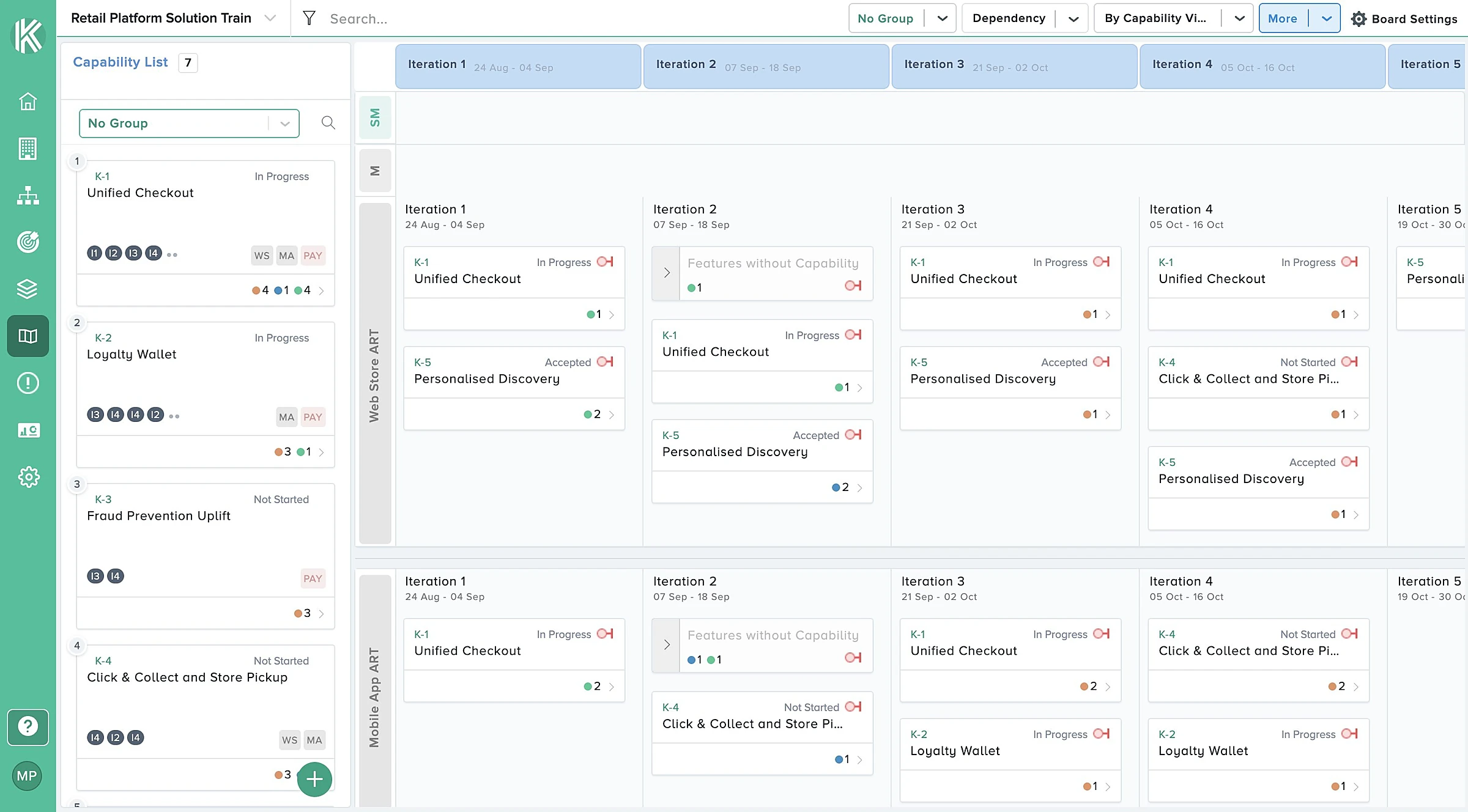
A solution board shows the capabilities of your solution against the iterations of every linked PI board. Each Agile Release Train gets its own swimlane, in its own colour, with its own iterations as columns.
- Link up to 30 PI boards to one solution board.
- Switch between By Capability View and By Feature View.
- Group by status, PI, planned or unplanned, capability parent or your own custom fields.
- Use your own words for parent, child, iteration and story.
 Full view
Capabilities from Jira, Azure DevOps or Kendis, side by side
Capabilities are the backbone of the board. Bring them in from wherever they live. A capability becomes planned through its features: as soon as one of its features is planned on a PI board, the capability appears in that ART and iteration.
- Pull capabilities with saved filters, JQL or WIQL, from several Jira and Azure DevOps accounts at once.
- Parents of your PI boards' features come in automatically, with the features already under them.
- Relate a Jira capability to Azure DevOps features. Kendis keeps the link and counts it in progress.
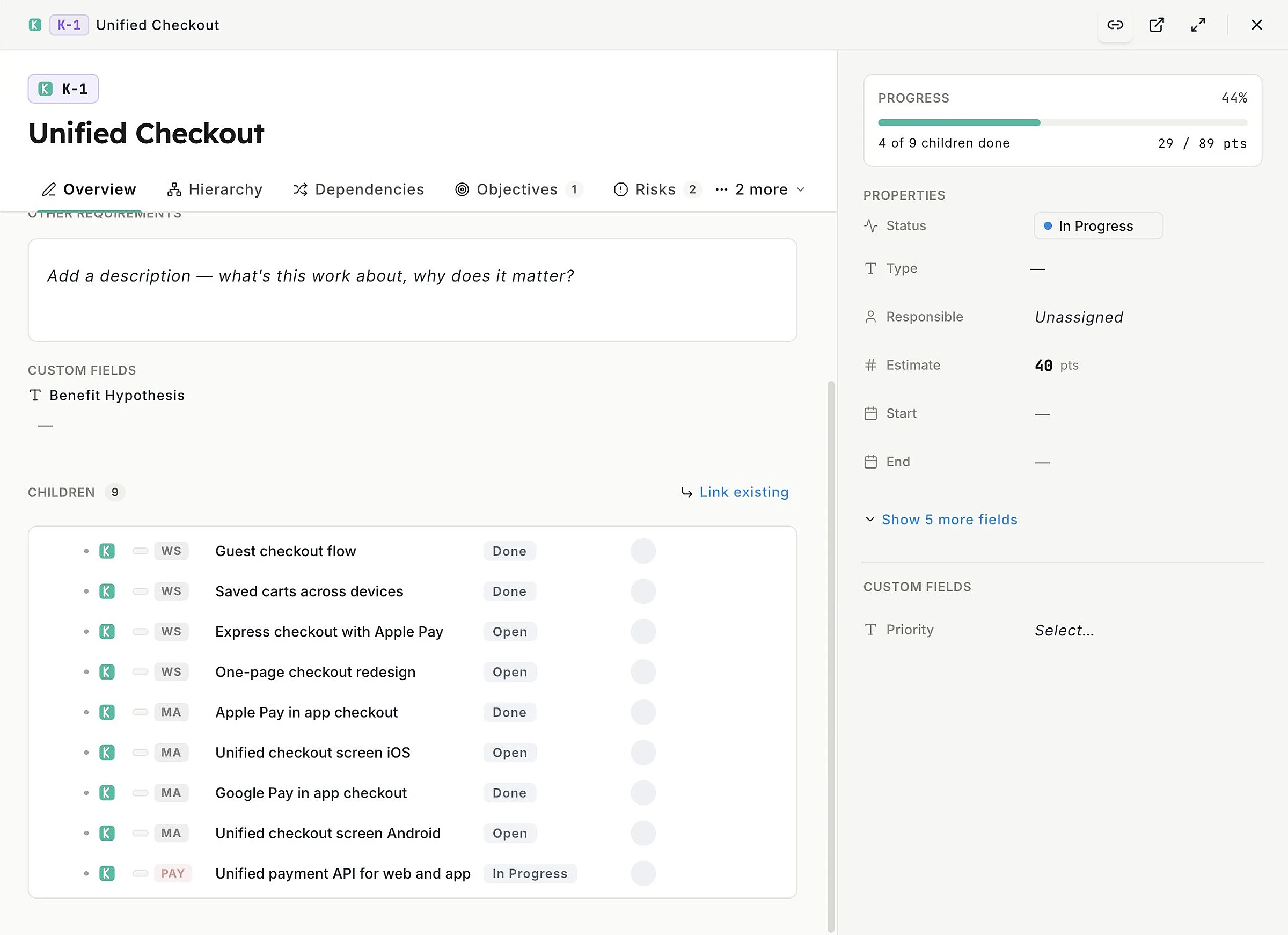
- See every child across ARTs, with live status, in one popup.
 Full view
Cross-ART dependencies you can see and act on
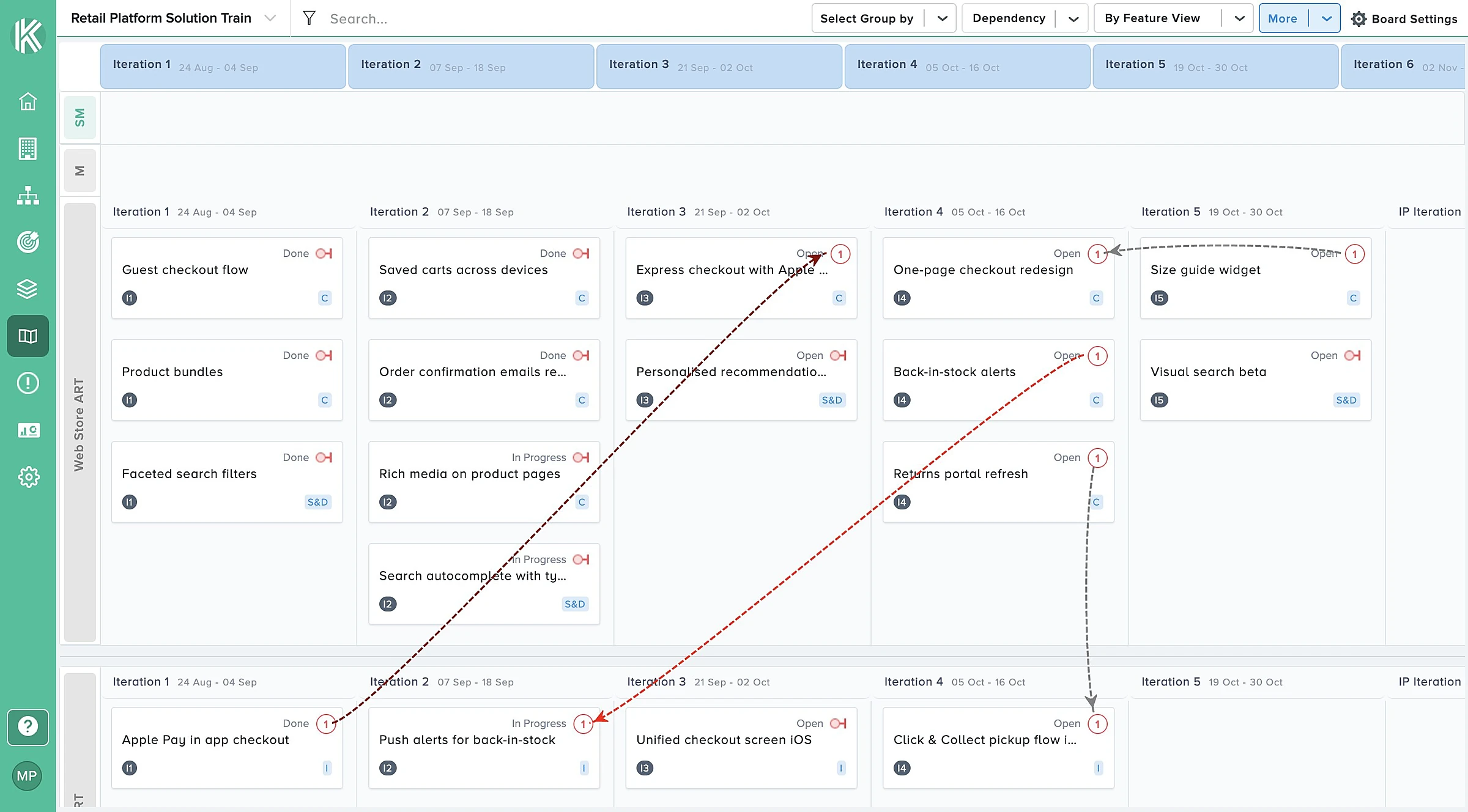
A PI board only shows its own side of a dependency. The solution board shows both ends and the line between the ART swimlanes, and the colour tells you whether it is a problem.
- Drag from one feature to another to create a dependency, or use Create by Search for items far apart.
- Grey is aligned, blue is synced from Jira or Azure DevOps, red is overdue, dark red is in the wrong order.
- Dependencies from Jira issue links and Azure DevOps relations appear automatically.
- Dependency Tracking counts total, within-board, cross-board, completed, overdue and reverse dependencies.
 Full view
Capability Progress: what is landing this increment
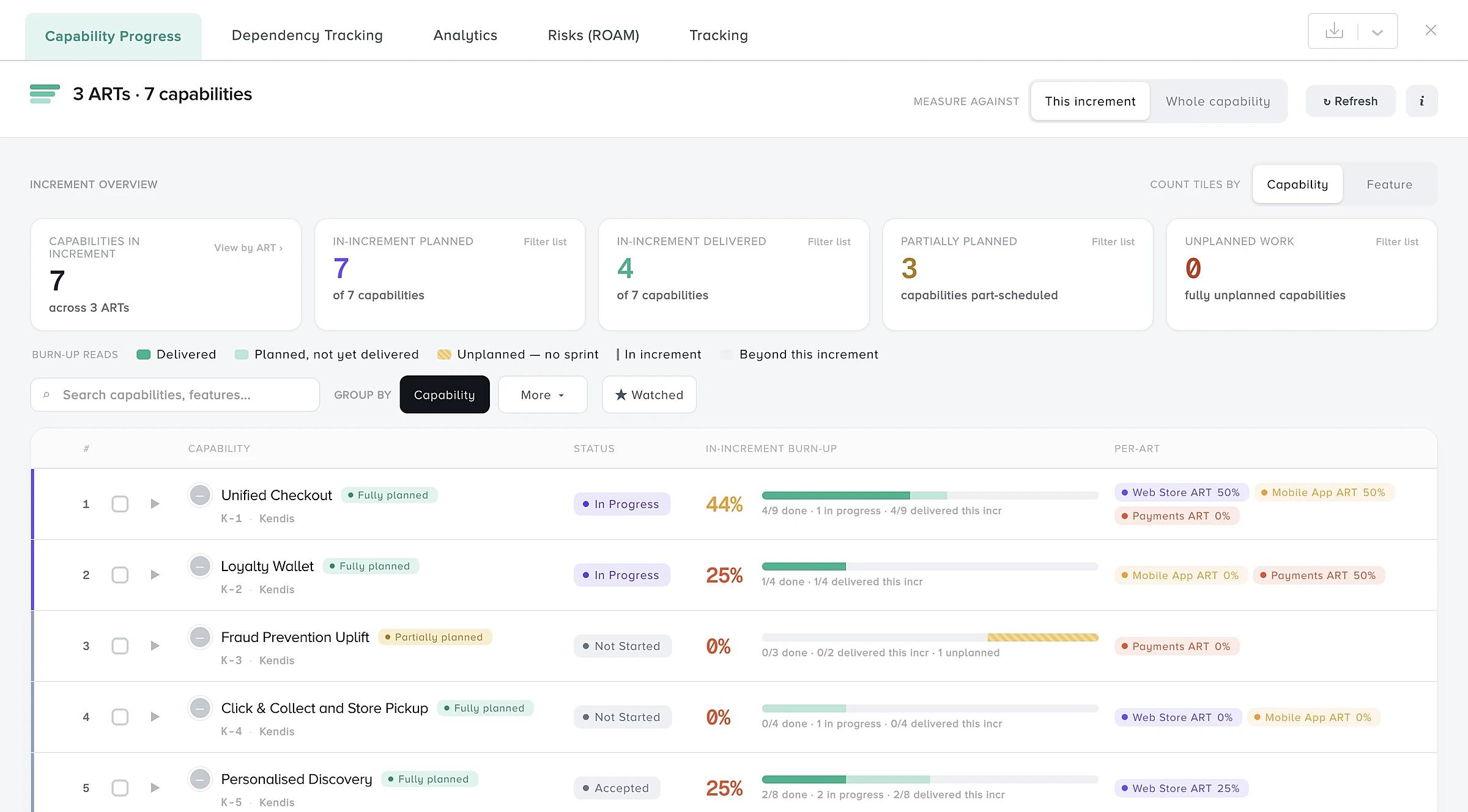
Capability Progress answers the question every solution sync starts with: how much of each capability is landing this increment, and which ART is carrying it?
- Tiles for capabilities in the increment, planned, delivered, partially planned and unplanned.
- Per-ART contribution for each capability, with the largest share marked as the long pole.
- Scope churn since plan: features linked and unlinked since tracking began.
- Filter by ART, status, team, owner or sprint, and export to CSV or Excel.
 Full view
Are we still on plan? Compare against the planning baseline
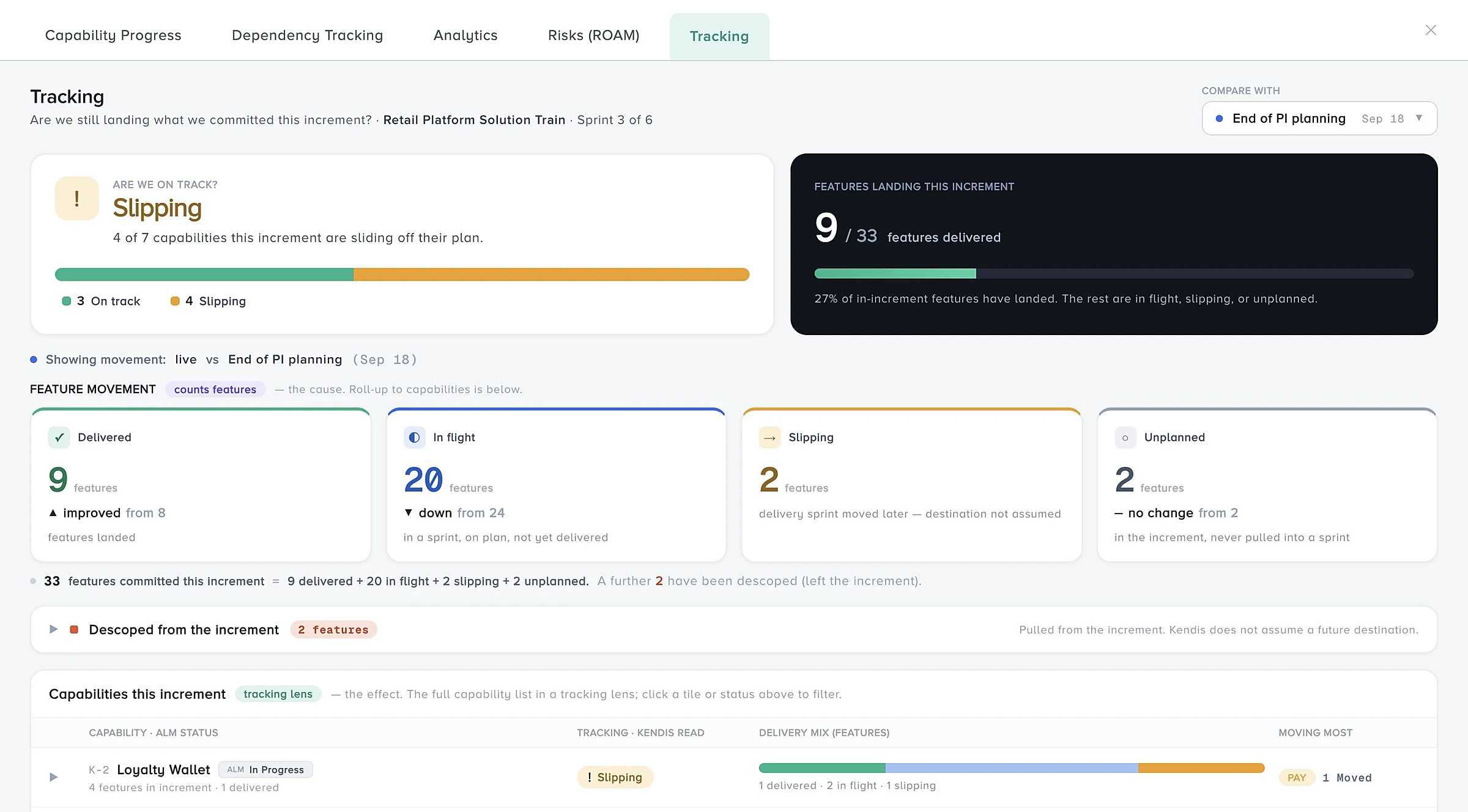
Tracking compares live data with a snapshot. Kendis captures the baseline automatically when a linked PI board moves to the Tracking state, then one snapshot at the end of every sprint.
- A verdict for the solution: on track, slipping or behind plan.
- Features delivered against features committed.
- Movement since the snapshot: delivered, in flight, slipping and unplanned.
- Choose which snapshot to compare with. Sprint snapshots are never overwritten.
 Full view
Solution objectives and key results, with business value
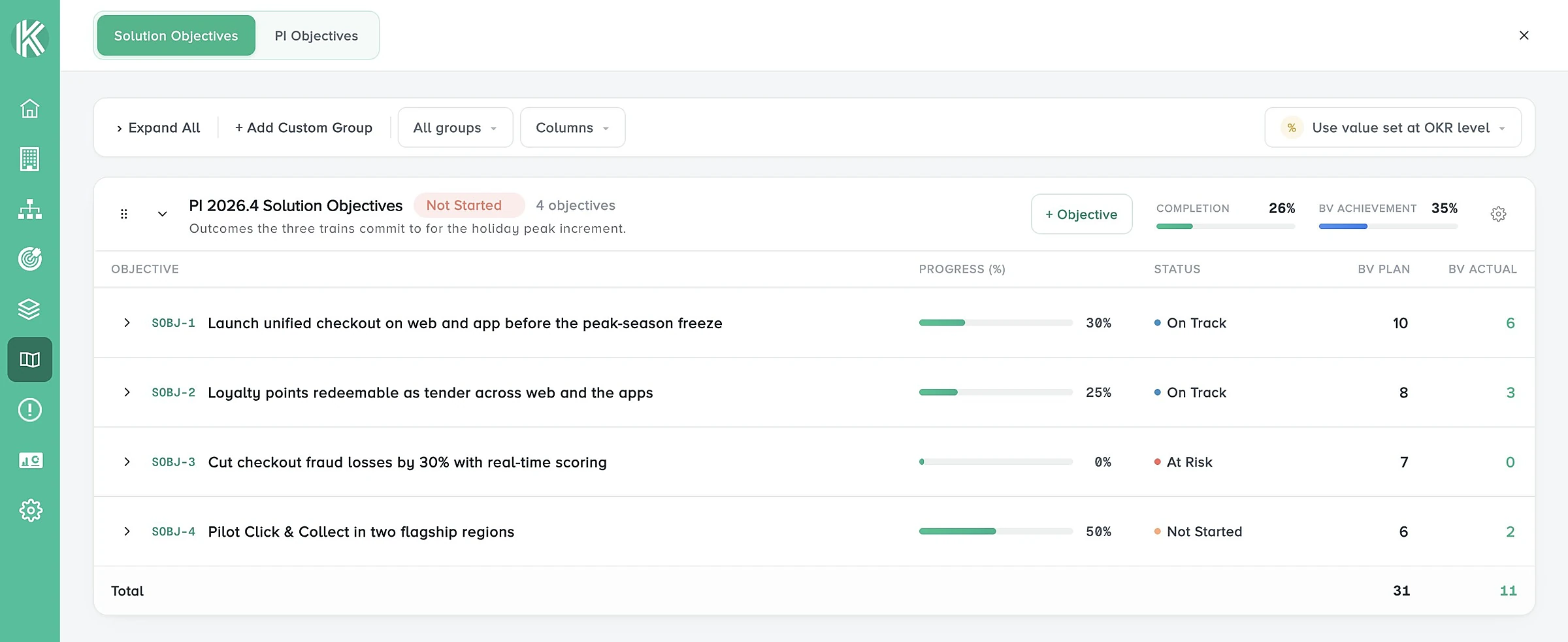
Write objectives for the solution, group them by PI, and link them to the capabilities that deliver them. Progress is calculated from the work, and you can also see what each train committed to.
- Committed and uncommitted objectives with BV plan and BV actual.
- Key results under each objective.
- Group completion and BV achievement worked out for you.
- A PI Objectives tab showing the objectives set on every linked PI board.
 Full view
One ROAM view across every risk register
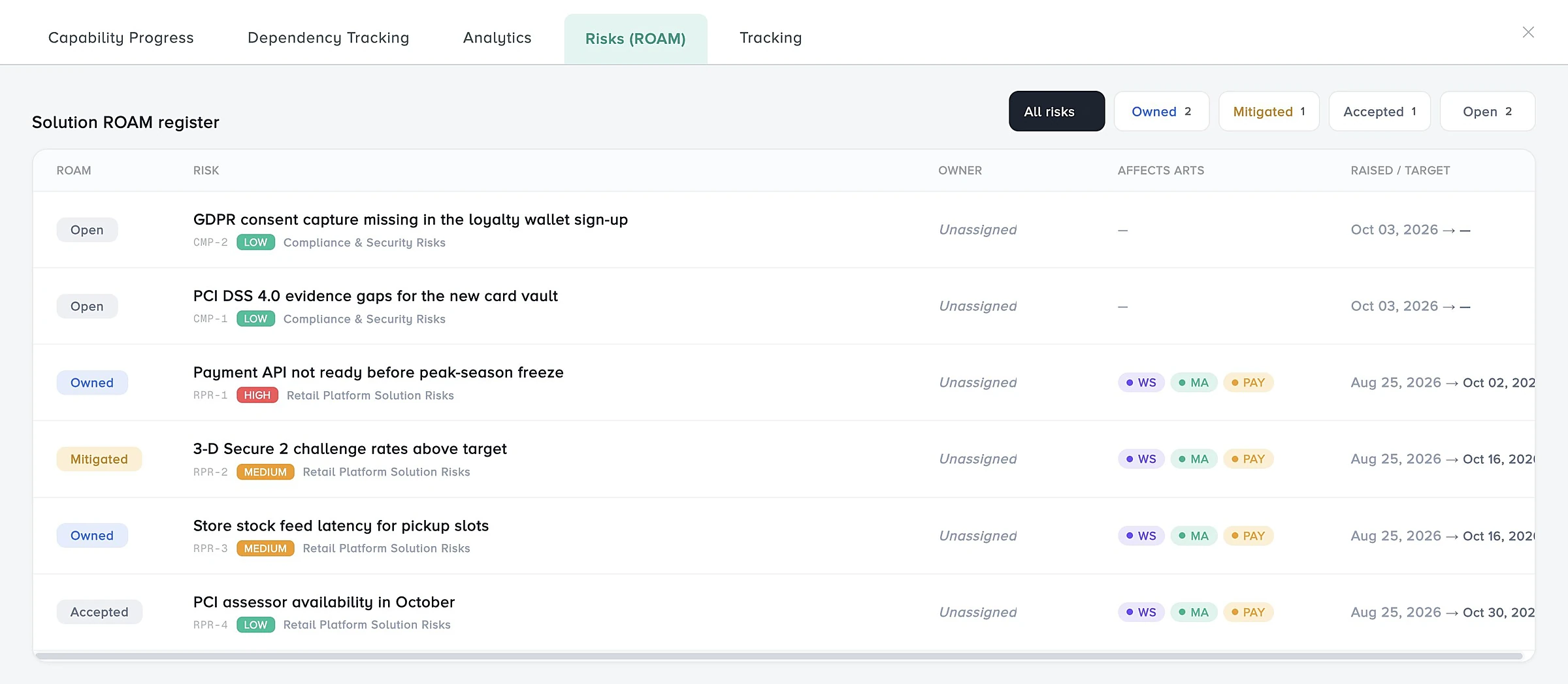
Risks rarely stay inside one ART. A solution board brings several risk registers together: the register of every linked PI board is added automatically, and you can link or create more.
- List and board views, with one swimlane per register.
- Each risk keeps its own register's workflow, risk matrix and fields.
- A Risks (ROAM) tab showing Owned, Mitigated, Accepted and Resolved across the solution.
- See which ARTs each risk affects, and link risks to capabilities.
 Full view
A timeline with milestones and phases
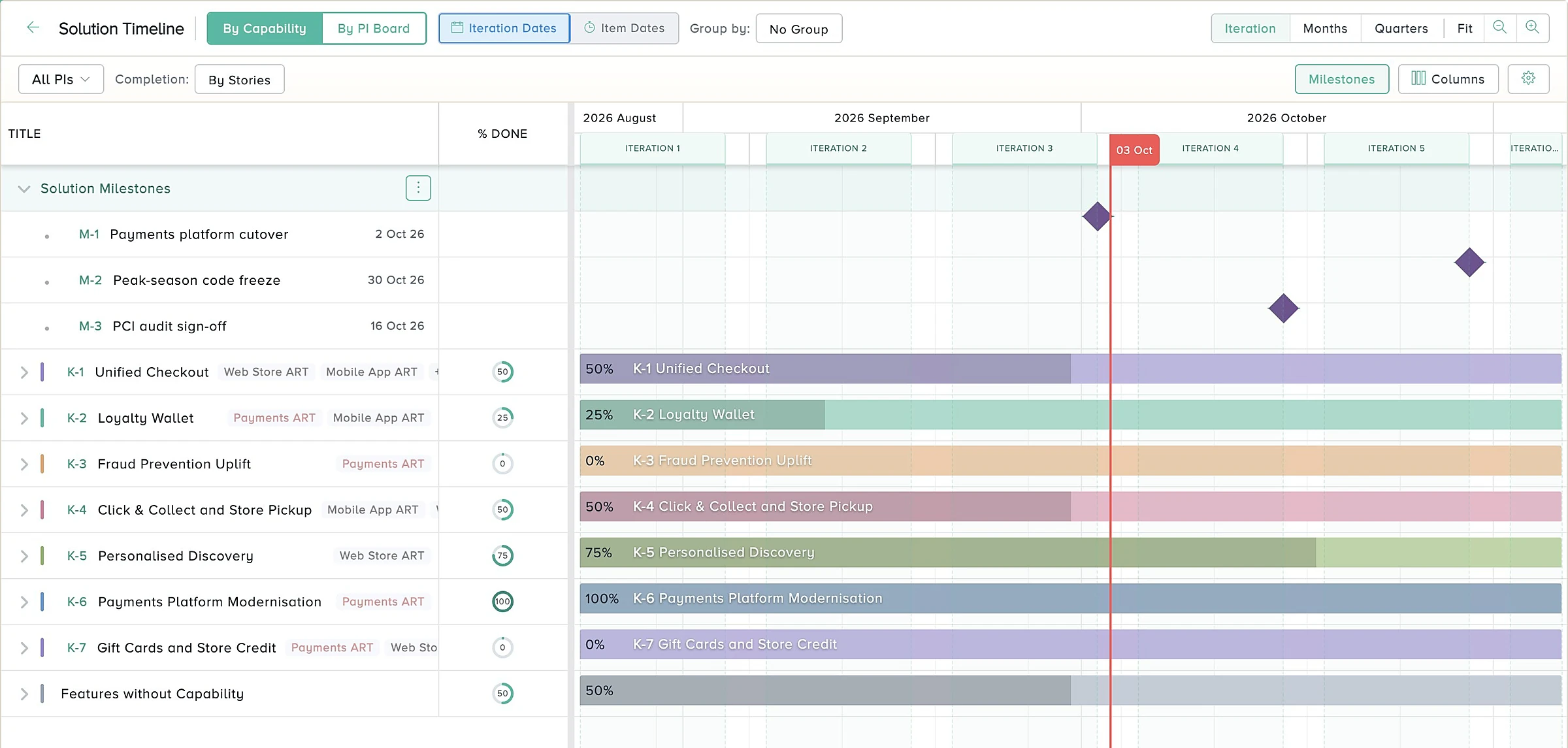
The Solution Timeline draws every capability as a bar across the solution iterations, with its features underneath and milestones as diamonds.
- View by capability or by PI board, on iteration dates or item dates.
- Add milestones for single dates and phases for date ranges.
- Link the capabilities, features and stories a milestone depends on, and see its progress.
- Share a milestone with other collections, PI boards and solution boards.
 Full view
How do you set up a solution board?
Six steps, and the features already planned on each PI board appear in their swimlanes straight away.
- 1
Create a Solution Area
The folder for one Solution Train.
- 2
Create a Solution Board
Give it a name and a prefix.
- 3
Link your PI boards
Each one becomes a swimlane.
- 4
Bring in capabilities
From Jira, Azure DevOps or Kendis.
- 5
Set the iterations
Add solution and PI milestones.
- 6
Run your solution sync
Dependencies, progress, risks, tracking.
Step-by-step instructions for every screen are in the Solution Board help centre.
What is the difference between a PI board and a solution board?
A PI board is where one train plans. A solution board sits above several of them and shows the whole solution.
| PI board | Solution board | |
|---|---|---|
| Scope | One Agile Release Train | Up to 30 PI boards |
| What you plan | Features and stories by team and sprint | Capabilities, through the features planned on each PI board |
| Swimlanes | Teams | Agile Release Trains |
| Dependencies | Within the train | Within and across trains, with both ends visible |
| Objectives | PI Objectives | Solution objectives and key results, plus every train's PI Objectives |
| Risk registers | One | Any number, with the PI boards' registers added automatically |
| Tracking baseline | The board's own states | A planning snapshot plus one per sprint |
See the program board for planning inside one train, and dependency management, ROAM risks and OKRs and strategic themes for the modules the solution board builds on.
Who is the solution board for?
Anyone who has to answer for more than one train.
- Solution Train EngineersRun pre-planning and the solution sync from one board.
- Solution ManagementSee which capabilities are landing and which are slipping.
- Release Train EngineersSee what other trains need from yours, and when.
- Tribes and product areasThe same board with your own terminology, without SAFe.
"Kendis solution board solved our problem of managing dependencies across multiple release trains, our Solution Syncs are more effective."
Related guides: Agile Release Train, dependency management, ROAM and scaling agile.
Solution board: frequently asked questions
What is a solution board in Kendis?
A solution board shows the capabilities of a solution against the iterations of every linked PI board, with one swimlane per Agile Release Train. It is where a Solution Train sees cross-ART dependencies, progress, objectives, risks and milestones in one place.
How many PI boards can a solution board hold?
A solution board can hold up to 30 PI boards, and at least one has to stay linked.
What is the difference between a PI board and a solution board?
A PI board is where one Agile Release Train plans its features and stories. A solution board sits above several PI boards and shows their capabilities, cross-ART dependencies and combined progress. A PI board has one risk register, while a solution board can bring many together.
Can a solution board combine Jira and Azure DevOps?
Yes. Linked PI boards can sync with Jira or Azure DevOps, and capabilities can be pulled from several accounts of both tools at the same time. You can also relate a Jira capability to Azure DevOps features. Kendis keeps that relation and counts it in progress and analytics.
How do capabilities get onto the solution board?
In four ways: create them in Kendis, add existing Kendis capabilities, add single items from Jira or Azure DevOps, or import them with a saved filter, JQL or WIQL query. Parents of features on linked PI boards also come in automatically.
How does the solution board show dependencies between ARTs?
As dashed lines from the provider to the receiver, across swimlanes when the two features are on different PI boards. Grey means aligned, blue means synced from Jira or Azure DevOps, red means overdue and dark red means the order is reversed.
Does the solution board support SAFe Large Solution?
Yes. It is built for Solution Trains: capabilities, several Agile Release Trains, solution objectives, solution milestones, a combined ROAM view and tracking against the PI Planning baseline.
Can I use a solution board without SAFe?
Yes. The terminology for parent, child, iteration and story is configurable, so the same board works for tribes, product areas or any group of teams that plan together.
Is the solution board included in the free trial?
Yes. Solution boards are part of the six-month free trial, along with the program board, dependencies, objectives, the ROAM risk register and two-way sync with Jira and Azure DevOps.
Feature details on this page follow the Kendis Solution Board documentation. Last updated . SAFe is a registered trademark of Scaled Agile, Inc.
See your whole Solution Train on one board
Kendis is free for six months with no credit card. Connect Jira or Azure DevOps, link your PI boards and run your next solution sync from the board.
Solution boards are included in the trial. EU or US hosting. See pricing.