PI Planning in 60 seconds
- What it is: a cadence-based event where every team on an Agile Release Train (ART) plans the next Planning Interval together.[1]
- How often: every 8 to 12 weeks, usually as a two-day event led by the Release Train Engineer (RTE).[1]
- Who attends: the whole ART, typically 50 to 125 people, plus Business Owners and other stakeholders.[2]
- What comes out: committed PI Objectives for each team and an ART Planning Board showing feature delivery dates, cross-team dependencies and milestones.[3]
- Remote works: SAFe states that virtual planning is effective when physical presence is not possible, provided the whole ART takes part.[1]
- Naming: since SAFe 6.0, PI stands for Planning Interval. It was called Program Increment before, and the program board is now the ART Planning Board.[4]
What is PI Planning?
PI Planning is a cadence-based event in the Scaled Agile Framework (SAFe) in which all teams on an Agile Release Train meet, in person or online, to align on a shared mission and vision and plan the next 8 to 12 weeks of work. It typically lasts two days and is led by the Release Train Engineer.[1]
The official SAFe definition is short: PI Planning is "a cadence-based event for the entire ART that aligns teams and stakeholders to a shared mission and vision."[1] In practice it is the one moment in the quarter when the people who decide what to build, the people who build it and the people who pay for it are looking at the same plan at the same time.
A Planning Interval (PI) is a timebox of 8 to 12 weeks. A common pattern is four or five development iterations followed by one Innovation and Planning (IP) iteration, although SAFe presents that pattern as a suggestion and not a rule.[4] PI Planning itself takes place inside the IP iteration, so teams are not asked to plan the next interval while still delivering the current one.[5]
PI Planning is also known as Program Increment planning (the pre-6.0 SAFe name, still used in Atlassian and Microsoft documentation[6]), quarterly planning or big room planning. The names differ. The event is the same.
Which version of SAFe does this guide follow?
This guide follows SAFe 6.0, which is still the latest numbered version of the framework.[7] Scaled Agile now updates SAFe continuously and introduced AI-Native SAFe in June 2026 as an operating model built on the same foundation.[8] Nothing in those updates changes the purpose or shape of PI Planning described here.
| Older term | Current SAFe term |
|---|---|
| Program Increment (PI) | Planning Interval (PI)[4] |
| Program board | ART Planning Board[3] |
| Scrum of Scrums | Coach Sync. Together with the PO Sync it forms the ART Sync[9] |
| Program backlog, program Kanban | ART Backlog, ART Kanban |
| Program predictability measure | ART Predictability Measure[3] |
Why does PI Planning matter?
PI Planning matters because it replaces dozens of separate team plans with one plan the whole Agile Release Train has seen, challenged and committed to. Dependencies, capacity gaps and risks surface in two days of conversation instead of appearing weeks later as missed dates.
A single agile team can plan a sprint in an afternoon. Once work spreads over five, eight or twelve teams, the hard problems are no longer inside a team. They sit between teams: one team needs an API another has not scheduled, a shared platform team is committed twice over, a compliance milestone is known to one person.
The Agile Manifesto holds that face-to-face conversation is the most efficient and effective way to convey information to and within a team[10], and that principle is the reason the event exists. PI Planning puts a time limit and a structure around that conversation for the entire train. The outcomes teams usually name are:
- Alignment. Every team hears the same business context, product vision and architecture direction, first hand.
- Visible dependencies. Cross-team links are agreed and placed on a shared board while both teams are present.
- Realistic load. Teams plan against their own capacity, so the plan reflects what can be done and not what was hoped for.
- Faster decisions. Scope trade-offs are made on the spot with Business Owners in the room.
- Shared ownership. Teams write and commit to their own objectives, which is different from being handed a deadline.
What are the outputs of PI Planning?
PI Planning produces two outputs: a set of committed PI Objectives for every team, and an ART Planning Board that shows feature delivery dates, dependencies between teams and relevant milestones.[3]
PI Objectives
PI Objectives "summarize the business and technical goals that teams and trains intend to achieve in the upcoming PI and are either committed or uncommitted."[11] Committed objectives are the ones a team is confident it can deliver. Uncommitted objectives are stretch goals with known uncertainty. They are planned and worked on, but they are kept out of the commitment so that one unknown does not put the whole plan at risk.
Business Owners, the stakeholders with primary responsibility for return on investment, governance and compliance[12], assign a business value to each objective during the event. Teams commonly use a 1 to 10 scale. Those scores are later compared with the value actually delivered, which is how the ART Predictability Measure is calculated.[3]
Good PI Objectives are written in plain language and describe an outcome a Business Owner can recognise. "Customers can pay by direct debit in two new markets" is an objective. "Complete stories 4411 to 4460" is a list.
The ART Planning Board (program board)
The ART Planning Board is "a visualization of the PI's feature delivery dates, feature dependencies among teams, and relevant milestones."[3] It has one row per team and one column per iteration. Features sit in the iteration where they finish, and a line between two cards means one team is waiting on another.
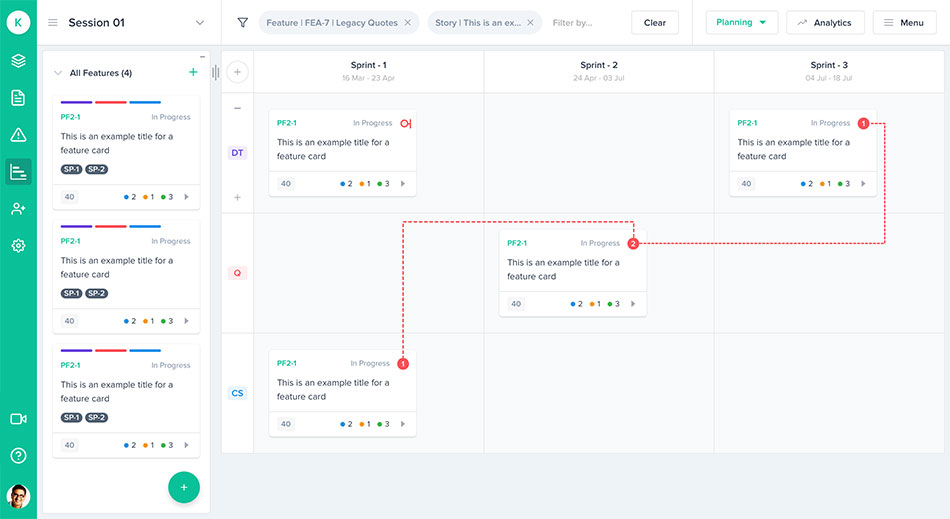
On a physical wall this board was built with cards and red string. A digital program board does the same job and stays alive after the event: when a feature slips an iteration in Jira or Azure DevOps, the board and its dependency lines move with it.
Who attends PI Planning?
The entire Agile Release Train attends PI Planning: every agile team, the Release Train Engineer, Product Management, the System Architect, Business Owners and other stakeholders. SAFe sizes an ART at 50 to 125 people.[2]
An Agile Release Train is "a long-lived team of Agile teams that incrementally develops, delivers, and often operates one or more solutions in a development value stream."[2] Each agile team is cross-functional and typically has ten or fewer people[3], the same team size the Scrum Guide recommends.[13]
| Role | What they do in PI Planning |
|---|---|
| Release Train Engineer (RTE) | Leads and facilitates the event, presents the planning process and expected outcomes, and keeps the agenda on time. SAFe describes the RTE as "a servant leader and ART coach."[14] |
| Business Owners | Present the business context, take part in the management review, and assign business value to each team's PI Objectives.[12] |
| Product Management | Presents the product vision and the highest-priority features from the ART Backlog, usually ranked with WSJF.[15] |
| System Architect | Presents the architecture vision, enablers and non-functional requirements, and helps teams find technical dependencies. |
| Product Owners | Bring team backlogs, split features into stories with the team, and help write the team's PI Objectives. |
| Scrum Masters / Team Coaches | Facilitate the team breakouts, help the team work out capacity, and raise risks and impediments in the Coach Sync.[3] |
| Agile teams | Estimate and sequence stories into iterations, identify dependencies and risks, draft PI Objectives, and take part in the confidence vote. |
| Shared services and suppliers | Join the teams that depend on them, so their capacity and dates are part of the plan and not an assumption. |
How often is PI Planning held, and how long does it take?
PI Planning is held once per Planning Interval, which means every 8 to 12 weeks, and is typically a two-day event.[1] Most organisations run it four or five times a year on dates published a year ahead.
The fixed cadence is the point. When the dates are known a year out, travel, venues, release milestones and steering meetings can all be arranged around them. Many trains align their PIs with calendar quarters, which is why you will also hear the event called quarterly planning.
The event takes place in the Innovation and Planning iteration. SAFe says the IP iteration "provides an estimating buffer for meeting PI Objectives and dedicated time for innovation, continuing education, PI Planning, and Inspect and Adapt (I&A) events", and that no work is planned into it during PI Planning.[5] Treating that iteration as spare delivery capacity is one of the most common ways trains lose their predictability.
What is the PI Planning agenda?
The standard PI Planning agenda runs over two days. Day one covers business context, product vision, architecture vision, team breakouts and a draft plan review. Day two covers planning adjustments, final team breakouts, the final plan review, risks, the confidence vote and a retrospective.
The timings below are a sample two-day agenda that many trains start from. Adjust the clock times to your working day and keep the order.
| Time | Session | Led by | Purpose |
|---|---|---|---|
| 08:00 to 09:00 | Business context | Business Owner or senior executive | State of the business and what the portfolio needs from this train. |
| 09:00 to 10:30 | Product and solution vision | Product Management | The top features for the PI and the milestones that matter. |
| 10:30 to 11:30 | Architecture vision and development practices | System Architect | Enablers, technical direction and any changes to how teams build and release. |
| 11:30 to 13:00 | Planning context and lunch | RTE | How the event works, what "done" looks like for the two days. |
| 13:00 to 16:00 | Team breakouts 1 | Teams | Capacity per iteration, stories, draft objectives, dependencies and risks. |
| 16:00 to 17:00 | Draft plan review | Teams | Each team presents its draft plan, objectives, risks and dependencies. |
| 17:00 to 18:00 | Management review and problem solving | RTE with Business Owners | Resolve scope, people and dependency issues raised in the draft plans. |
| Time | Session | Led by | Purpose |
|---|---|---|---|
| 08:00 to 09:00 | Planning adjustments | Business Owners | Changes to scope, priorities or people decided the evening before. |
| 09:00 to 11:00 | Team breakouts 2 | Teams | Finalise plans. Business Owners assign business value to objectives. |
| 11:00 to 13:00 | Final plan review and lunch | Teams | Each team presents its final plan for acceptance by Business Owners. |
| 13:00 to 14:00 | ART risks | RTE | Risks that could not be solved in the team are discussed and ROAMed. |
| 14:00 to 14:15 | Confidence vote | RTE | Teams, then the whole train, vote on their confidence in meeting the objectives. |
| 14:15 to 16:00 | Plan rework, if needed | Teams | Rework the plan until confidence is acceptable. |
| 16:00 to 17:00 | Planning retrospective and next steps | RTE | What to keep and change for the next event, and how the PI starts. |
What is the confidence vote?
The confidence vote "measures the teams' and ARTs' belief in their ability to deliver the established PI Objectives."[3] It is usually run as a fist of five: everyone holds up one to five fingers. A common working rule is that an average of three or more means the plan is accepted, and that anyone voting one or two is asked to explain their concern, which may send the plan back for rework. In Kendis the confidence vote can be cast per team or for the whole PI, and the result is stored with the plan.
How are risks handled?
Risks raised during planning are ROAMed in front of the whole train. Each one is placed in one of four categories: Resolved (no longer a concern), Owned (someone takes responsibility for it), Accepted (nothing more can be done, the train accepts it) or Mitigated (there is a plan to reduce its impact). The value is in the conversation and in every risk leaving the room with a name next to it. See how a ROAM risk register links each risk to the features it threatens.
Tip from the fieldProtect the team breakouts. They are the only part of the agenda where the plan is actually made. If briefings overrun by forty minutes, take the time from the briefings in the next PI, not from the breakouts in this one.
How do you run remote or distributed PI Planning?
Remote PI Planning follows the same agenda with the same outputs, usually spread over three or four shorter days to suit time zones and limit screen fatigue. The physical wall is replaced by a digital planning board that the whole train can edit at once and that syncs with Jira or Azure DevOps.
SAFe's position is clear. Real-time, virtual and face-to-face planning "has also proven effective when physical presence is not possible, as long as all members of the ART participate."[1] That matters, because distributed work is the normal case now. Gallup reports that, as of May 2026, 52% of US employees in remote-capable jobs work hybrid and 26% work fully remotely.[16]
SAFe's guidance on distributed PI Planning groups the preparation into six areas[17]:
- Planning locations. Keep the number of locations as low as you can. SAFe advises against splitting the members of a single team across locations where it can be avoided.[17]
- PI Planning agenda. Redesign the schedule around the overlap in working hours. Record briefings so they can be watched ahead of time.
- Facilities. Each location needs a room, screens and audio that let remote colleagues be heard as well as seen.
- Working agreements. Agree cameras, response times, break lengths and how to ask for help from another team.
- Tooling. One planning board, one video platform, one chat channel per team and one for the train.
- Facilitation. One facilitator per location or per breakout room, and a rehearsal before the event.
A sample remote PI Planning agenda for two time zones
This sample uses a four-hour daily window where Central European and Australian Eastern working hours overlap. With a wider overlap you can run it in two and a half days.
| Day | Sessions | Before the next day |
|---|---|---|
| Day 1 | Opening, business context, product vision, architecture vision, planning context, first team breakout with a Coach Sync checkpoint. | Teams continue breakouts in their own working hours. |
| Day 2 | Team synchronisation, draft plan review, management review and problem solving, planning adjustments, second team breakout. | Teams finalise plans and objectives. Business Owners score objectives. |
| Day 3 | Final plan review, ART risks and ROAM, confidence vote, rework if needed, retrospective and next steps. | RTE publishes the plan and the objectives summary. |
Do not treat remote planning as a permanent replacement for meeting. Atlassian's own data on its distributed workforce found that intentional in-person gatherings produced a 27% increase in feelings of connection that lasted four to five months.[18] Many trains now plan remotely and meet in person once or twice a year. Kendis customers such as Nordea moved to fully remote PI Planning at short notice, and the distributed PI Planning page shows how the board supports it.
Tip from the fieldSend one page before the event: who to contact in each team, which channel to use for what, and what happens if the main tool fails. It answers most of the questions people would otherwise ask in the first hour.
What are the most common PI Planning challenges?
The most common PI Planning problems are an unprepared backlog, briefings that eat the breakout time, dependencies found too late, plans that ignore real capacity, objectives written as task lists, and a plan that is out of date a week after the event.
| Challenge | What it looks like | What fixes it |
|---|---|---|
| Backlog not ready | Teams meet features for the first time in the breakout. | Refine and rank the top features two to three weeks ahead. Share them before the event. |
| Briefings overrun | Three hours of slides, ninety minutes of planning. | Time-box and pre-record briefings. Start breakouts on time, always. |
| Late dependencies | A blocking dependency appears in iteration three. | Map dependencies on the board during breakouts and review them in every Coach Sync. |
| Over-commitment | Every iteration is loaded to 100% or more. | Plan against capacity per iteration, including leave, and leave the IP iteration empty.[5] |
| Weak objectives | Objectives repeat feature titles and cannot be scored. | Write outcomes in business language and separate committed from uncommitted.[11] |
| Manual re-keying | The plan lives on a whiteboard and is typed into Jira afterwards. | Plan on a board that writes to the ALM tool in real time. |
| The plan goes stale | Nobody looks at the board after day two. | Use the same board for tracking. Review scope change and dependencies in the ART Sync. |
The re-keying problem deserves a note. General-purpose whiteboards are quick to start with, but the plan made on them is a picture of the backlog and not the backlog. Someone has to transfer every story, estimate and dependency into Jira or Azure DevOps after the event, and from that moment the two drift apart. If you are weighing that trade-off, see the comparison with whiteboard tools.
What should be on a PI Planning preparation checklist?
A PI Planning checklist covers three kinds of readiness: organisational readiness (strategy, scope, teams and roles), content readiness (business context, vision, ranked backlog, architecture) and logistics readiness (dates, locations, tooling and communication channels).
Start four to six weeks before the event. For trains that are part of a Solution Train, the Pre-Plan activities align the ARTs before each of them plans.[19]
Organisational readiness
- Scope of the planning is agreed: which product, which teams plan together.
- Business Owners are named, briefed and available for both days.
- Every team has dedicated members, a Product Owner and a Scrum Master or Team Coach.
- PI dates, iteration dates and the IP iteration are published.
Content readiness
- Business context briefing is prepared by an executive or Business Owner.
- Product vision and the top ten or so features are ranked and refined.
- Architecture vision, enablers and non-functional requirements are ready.
- Known milestones, fixed dates and external commitments are listed.
- Team capacity per iteration is calculated, including planned leave.
- Results of the last Inspect and Adapt are available to the teams.
Logistics readiness
- Venue or video platform is booked and tested, with breakout rooms per team.
- The planning board is set up: teams, iterations, features loaded from Jira or Azure DevOps.
- Everyone has access to the board and has opened it at least once.
- Communication channels are agreed: one for the train, one per team, one for facilitators.
- Agenda with time zones is sent, with recorded briefings where used.
- A fallback is agreed in case a tool or connection fails.
How do you run PI Planning step by step with Jira or Azure DevOps?
Run PI Planning in three phases. Before the event, set up the board and load ranked features from Jira or Azure DevOps. During the event, plan stories into iterations, map dependencies, write objectives, ROAM risks and vote. After the event, switch the same board to tracking.
The steps below use Kendis, which syncs both ways with Jira Cloud, Jira Data Center and Azure DevOps. A change on the board is written to the ALM tool and a change in the ALM tool appears on the board, so nothing is typed twice. The sequence is the same with any tool that keeps the plan and the backlog connected.
Before PI Planning
- Create the PI board and set the PI start date, end date and iteration length.
- Connect your ALM tool. For Jira, connect the relevant boards. For Azure DevOps, provide the organisation URL and an access token.
- Create the teams and map each one to its Jira board or Azure DevOps team.
- Load the features with a Jira filter or JQL query, or an Azure DevOps query. Stories already linked to those features come in with them.
- Rank the features and record their business value, so teams pull from an ordered backlog.
- Invite the train and ask everyone to open the board before the event.
During PI Planning
- Set capacity for each team in each iteration at the start of the first breakout.
- Pull features into iterations and break them into stories with estimates. New stories are created in Jira or Azure DevOps, linked to the feature and assigned to the sprint.
- Draw dependencies between cards and give each one a status and owner. See dependency management for how they are tracked afterwards.
- Write PI Objectives, mark them committed or uncommitted, and link them to the features that deliver them.
- Check load against capacity for every team and iteration before the draft plan review.
- Present the plan from the board in the draft and final plan reviews.
- ROAM the risks in the risk register and link each to the features it affects.
- Run the confidence vote for each team and for the PI.
After PI Planning
- Switch the board to tracking. The plan made in the event becomes the baseline.
- Track scope change automatically: features added or removed and stories that moved iteration since the baseline.
- Review dependencies and objectives in each ART Sync, and export or share the board with stakeholders.
There are dedicated walkthroughs for PI Planning in Jira and PI Planning in Azure DevOps.
Run your next two PI Planning events free
Kendis is a PI Planning and tracking platform that sits on top of Jira and Azure DevOps. The free trial runs for six months, long enough to plan and track two full PIs with your real backlog before anyone has to approve a budget.
- 6 months free, no credit card
- Choose EU hosting (OVHcloud, Frankfurt) or US hosting (AWS)
- Planning board, dependencies, PI objectives, ROAM risks, solution boards
- Two-way sync with Jira Cloud, Jira Data Center and Azure DevOps
- ISO/IEC 27001 certified, GDPR compliant, DORA Schedule available
- No user caps and no setup costs during the trial
One trial per organisation that has not used Kendis in the last twelve months. After the trial, Premium Cloud is $14 per user per month billed annually, or $16 monthly, and you license only the people who plan. SSO, Kendis AI and premium support are part of paid plans. See pricing and the free trial terms.
What happens after PI Planning?
After PI Planning the train executes the plan in iterations, synchronises in a regular ART Sync, shows integrated work in a System Demo every iteration, and closes the PI with an Inspect and Adapt event that measures results against the committed PI Objectives.
- ART Sync. Combines the Coach Sync and the PO Sync into one event for the train.[9] The Coach Sync "helps coordinate ART dependencies and provides visibility into progress and impediments."[3] Older material calls this the Scrum of Scrums.
- System Demo. The integrated work of all teams is shown to stakeholders. It is led by the RTE.[20]
- Inspect and Adapt. Held at the end of each PI in three parts: "the PI System Demo, a quantitative and qualitative measurement review, and a retrospective and problem-solving workshop."[21] Kendis has an Inspect and Adapt module that compares PIs side by side.
- ART Predictability Measure. Actual business value achieved is compared with planned business value for each team. The measure is "an average of the achievement score for each teams on the ART for the PI."[3]
- Flow metrics. SAFe measures flow through distribution, velocity, time, load, efficiency and predictability.[22] See flow metrics in Kendis.
What tools do you need for PI Planning, and where does the data live?
You need a planning board the whole train can edit at once, kept in sync with the tool where teams manage their backlog. For European organisations and regulated industries, where that plan is hosted is a selection criterion in its own right.
Both major ALM tools have native planning views, and it is worth knowing their limits before the event:
- Jira Plans. The Program board is available only in Jira Cloud Premium and Enterprise[6], and dependency lines can be shown for up to ten work items at once.[23]
- Azure DevOps Delivery Plans. A plan can show up to 20 team backlogs across projects[24], with dependency tracking based on predecessor and successor links.[25]
Neither includes PI Objectives with business value, a ROAM risk register, a confidence vote or predictability reporting, which is why trains add a PI Planning layer on top. A PI plan is not trivial data either. It holds your roadmap, release dates, named people, supplier commitments and known risks.
EU-hosted PI Planning
Under the GDPR, personal data may be transferred outside the EU only if the conditions in Chapter V are met.[26] For financial entities, DORA requires contracts with ICT providers to state the locations where data is processed and stored.[27] A tool hosted in the EU by a European provider removes the transfer question for the hosted data.
Kendis offers that choice at signup, including for the free trial. The Kendis European Cloud runs on OVHcloud in Frankfurt, Germany, with project data stored and processed in the EEA. The Global Cloud runs on AWS in the United States, and Kendis can also be self-hosted. The platform is ISO/IEC 27001 certified and a DORA Schedule is available for financial-sector customers. Details are on the security and compliance page.
PI Planning: frequently asked questions
What is PI Planning in SAFe?
PI Planning is a cadence-based event in the Scaled Agile Framework (SAFe) where every team on an Agile Release Train aligns on a shared mission and vision and plans the next Planning Interval of 8 to 12 weeks. It typically lasts two days and is led by the Release Train Engineer.
What does PI stand for in PI Planning?
PI stands for Planning Interval. Before SAFe 6.0 it stood for Program Increment, and many tools and articles still use that name. Both refer to the same 8 to 12 week timebox.
How long is a Planning Interval?
A Planning Interval is a timebox of 8 to 12 weeks. A common pattern is four or five development iterations followed by one Innovation and Planning iteration.
How long does PI Planning take?
In-person PI Planning typically takes two full days. Remote or distributed PI Planning keeps the same agenda but is usually spread over three or four shorter days to fit time zones and reduce screen fatigue.
Who facilitates PI Planning?
The Release Train Engineer (RTE) leads and facilitates PI Planning. The RTE owns the agenda, runs the management review and problem-solving session, facilitates the risk discussion and confidence vote, and makes sure every team leaves with committed PI Objectives.
What are the two main outputs of PI Planning?
The two outputs are committed PI Objectives for each team, with business value assigned by Business Owners, and the ART Planning Board, which shows feature delivery dates, dependencies between teams and milestones.
What is the difference between committed and uncommitted PI Objectives?
Committed objectives are those a team is confident it can deliver in the PI. Uncommitted objectives are planned stretch goals with known uncertainty. They are worked on, but they are not counted in the commitment, which protects the predictability of the plan.
What is the confidence vote in PI Planning?
The confidence vote measures how strongly the teams and the train believe they can deliver the PI Objectives. It is usually a fist of five. A common rule is that an average of three or more accepts the plan, and low votes are discussed and may lead to rework.
What does ROAM mean in PI Planning?
ROAM is how risks are handled at the end of PI Planning. Each risk is Resolved, Owned, Accepted or Mitigated, so every risk leaves the event with a decision and an owner.
What is the ART Planning Board?
The ART Planning Board, previously called the program board, is a visualisation of the feature delivery dates, feature dependencies among teams and relevant milestones for the PI. It has a row per team and a column per iteration.
Can PI Planning be done remotely?
Yes. SAFe states that virtual planning has proven effective when physical presence is not possible, as long as all members of the ART take part. Remote PI Planning needs a redesigned schedule, clear working agreements and a digital planning board that syncs with Jira or Azure DevOps.
Is PI Planning only for SAFe?
PI Planning is defined by SAFe, but the practice of planning a quarter with all teams together is used outside SAFe under names such as quarterly planning or big room planning. The agenda and outputs in this guide work for any group of teams with shared dependencies.
Is there a free PI Planning tool?
Kendis is free for six months with no credit card required. The trial includes the planning board, dependency management, PI Objectives, the ROAM risk register, solution boards and two-way sync with Jira Cloud, Jira Data Center and Azure DevOps.
Is there a PI Planning tool hosted in the EU?
Yes. Kendis offers a European Cloud hosted on OVHcloud in Frankfurt, Germany, where project data is stored and processed in the EEA. A US-hosted Global Cloud on AWS and a self-hosted option are also available, and the hosting region can be chosen for the free trial.
Sources
Every external claim in this guide links to the primary source below. All links were checked on 12 October 2026.
- Scaled Agile, Inc. PI Planning.
- Scaled Agile, Inc. Agile Release Train.
- Scaled Agile, Inc. SAFe Glossary.
- Scaled Agile, Inc. Planning Interval (PI).
- Scaled Agile, Inc. Innovation and Planning Iteration.
- Atlassian Support. What is the Program board in my plan?.
- Scaled Agile, Inc. SAFe 6.0 Configurations.
- Scaled Agile, Inc. What's new in SAFe?.
- Scaled Agile, Inc. Essential SAFe.
- Agile Alliance signatories. Principles behind the Agile Manifesto (2001).
- Scaled Agile, Inc. PI Objectives.
- Scaled Agile, Inc. Business Owners.
- Ken Schwaber and Jeff Sutherland. The Scrum Guide (November 2020).
- Scaled Agile, Inc. Release Train Engineer.
- Scaled Agile, Inc. WSJF (Extended Guidance).
- Gallup. Global Indicator: Hybrid Work (data to May 2026).
- Scaled Agile, Inc. Distributed PI Planning (Extended Guidance).
- Atlassian. Lessons learned: 1,000 days of distributed at Atlassian.
- Scaled Agile, Inc. Pre-Plan.
- Scaled Agile, Inc. System Demo.
- Scaled Agile, Inc. Inspect and Adapt.
- Scaled Agile, Inc. Measure and Grow.
- Atlassian Support. View and manage dependencies on the Program board.
- Microsoft Learn. Use team delivery plans (Azure Boards).
- Microsoft Learn. Track dependencies in Delivery Plans.
- GDPR-info.eu. Art. 44 GDPR: General principle for transfers.
- European Union. Regulation (EU) 2022/2554, Digital Operational Resilience Act (DORA).
How this guide is maintained: it is reviewed against the current SAFe framework articles and the vendor documentation listed above, and updated when terminology or guidance changes. Sample agendas, checklists and practical tips are Kendis guidance and are not official SAFe material. SAFe and Scaled Agile Framework are registered trademarks of Scaled Agile, Inc.